Writing code has got easier, but it's only one part of delivering software. Making the whole lifecycle as hands-off as possible takes more than a coding assistant.
To trust agents with more of that work, they need to understand what you want, follow your standards and have access to the right tools and information. You also need to be able to check the results and step in when needed.
The aim is for a small engineering team to guide the work and assess the quality of what's produced, while agents handle more of the planning, building, testing and day-to-day operation.
What is an AI software factory?
But what exactly is an AI software factory? In its idealistic form, it is the ability to take an idea and have agents and skills support the business case, the prototype, the design, the build, the deployment and the improvement afterwards, with human approval and assessment throughout.
It is being able to comply with your standards, principles, best practices and approaches automatically, so there is less input needed on each review, and to get to the point where most of the process is as hands-off as it can safely be.
What makes it an AI software factory, rather than a lot of coding agents? Agents doing discrete tasks, i.e. one plans, one builds, one tests, one reviews, one assesses the security, one deploys. Each contributes its part, collaborates with the others and feeds back to the team. Each part runs like a stage on a production line, and that's how a factory operates.
It's more the quality of what ships, i.e. the design, the UX, the architecture and the resilience, rather than the lines of code that got shipped.
By streamlining the process like this you can have smaller and leaner teams, with the AI software factory carrying the repeatable and automated work around them. A team of three can now carry a lot of the work with the support of the factory, which means you can potentially create more product teams with the people you already have.
What benefits does it drive?
What the industry data shows
These numbers all come from the engineering blogs and conference talks of high-calibre engineering organisations. These are individual company results, not a forecast for every team.
- Uber: more than 70% of pull requests attributed to agents.Uber Engineering, Running a Software Factory Efficiently at Uber Scale, 2026More than 70% of Uber's pull requests are attributed to local or cloud agents.
More than 70% of pull requests are attributed to local or cloud agents.
Uber engineering, self-reported, 27 August 2026 Usage up 7x since February with total AI spend roughly flat. Cost per session down 52%.Uber Engineering, Running a Software Factory Efficiently at Uber Scale, 2026Uber grew weekly active users 7x from February to August 2026 while total AI spend stayed roughly flat since April, and cut cost per session by 52% from its June peak.weekly active users ... grew 7x ... our total AI spend has relatively stabilized since April due to optimizations across the board ... cost per session is down 52% from its June peak
Uber engineering, self-reported; Uber notes the reductions are unique to its environment More than 250 automated migrations covering nine million lines of code.Uber, at AI Engineer World's Fair, Agentic SDLC at Uber: Building Blocks for Uber's Software Factory, 2026Uber has run more than 250 automated migrations covering nine million lines of code.more than 250 automated migrations, cumulatively covering nine million lines of code
Uday Kiran Medisetty and Adam Huda, AI Engineer World's Fair 2026 - Stripe: over 1,300 agent-written pull requests merged each week.Stripe, Minions: Stripe's one-shot, end-to-end coding agents, part 2, 2026Over 1,300 pull requests merged each week at Stripe are written entirely by agents and reviewed by people.
Over 1,300 Stripe pull requests (up from 1,000 as of Part 1) merged each week
Stripe engineering, self-reported, February 2026 - Spotify: over 3,000 agent pull requests merged.Spotify, at QCon London, Rewriting All of Spotify's Code Base, All the Time, 2026Spotify's background coding agent has helped get over 3,000 pull requests merged across several engineering disciplines.
has gotten over 3000 PRs merged across several engineering disciplines.
Jo Kelly-Fenton and Aleksandar Mitic, QCon London, 17 March 2026 - HubSpot: 90% faster first review feedback, with about 80% of rated comments given a thumbs-up.HubSpot, Automated Code Review: The 6-Month Evolution, 2026HubSpot's review agent cut the time to first feedback by 90% and gets an 80% thumbs-up rate from engineers, which is how HubSpot measures it.
Sidekick has reduced the time it takes for engineers to get feedback on their code by 90%
HubSpot engineering, tens of thousands of internal pull requests - OpenAI: about 70% more merged pull requests per engineer using Codex.OpenAI Forum, How OpenAI engineers use Codex to tackle big projects with rigor, 2025Engineers using Codex ship about 70% more merged pull requests, and Codex reviews every internal pull request.
engineers using it ship about 70% more merged pull requests ... Codex reviews every internal pull request
OpenAI technical staff, self-reported
How can shared standards improve quality?
Faros compared teams during periods of lower and higher AI adoption. It found that median review time was five times longer and bugs per pull request rose by 28% with higher adoption.Faros AI, The Acceleration Whiplash, AI Engineering Report Q2 2026, 2026With AI adoption, pull requests grew 51% larger, bugs per pull request rose 28%, median review time rose 5x and deployments per week fell 11.7%.Every finding reflects a statistically significant relationship between AI adoption and engineering outcomes.
Two years of telemetry from 22,000 developers across 4,000 teams; Faros sells engineering measurement
When developers use different instructions and review rules, the work they produce can vary, leaving reviewers to pick up the differences.
Let's take a shared review agent as an example of an AI agent in the factory. It can check for bugs, security issues and whether the code follows your standards before a person reviews it. The aim is to give your team more time to think through the design, the requirements and the risks.
You still, however, need to test whether those automated checks find the problems you expect them to.
How do you measure success?
Counting requests, tokens or pull requests tells you how much activity there is. You also need to know whether the team is delivering useful work safely and at a reasonable cost. Compare the results with your own baseline for similar work.
These are the questions I'd want answered:
- Did it solve the problem? Track completed work against the agreed requirements. For a bug, check whether it recurs. For a feature, check whether people use it and whether it achieves the intended result.
- Did delivery improve? Track how long changes take to reach production and how often you release. Faster code generation is useful only if work gets through testing, review and release as well.
- Did quality improve? Compare defects, reversions, failed changes and releases needed to repair earlier work. Check how much human review and rework agent output needs. For review agents, measure both useful findings and known problems they missed.
- Did reliability improve? Track recovery time after failed deployments, and incident recovery time more broadly. Record which incidents involved agent triage so you can compare similar incidents before and after.
- What did accepted work cost? Track cost per verified fix, review, upgrade or completed feature. Include model spend, infrastructure and people's time. Use the cost calculation below to investigate why the bill changed, including which skills and models did the work and how often cached input was reused.
- Are security issues being resolved? Track open critical issues, time from discovery to a verified fix in production, and new vulnerabilities introduced by changes.
- Can we keep software up to date safely? Track upgrades that reach production, their failure rate and the manual effort needed to complete them.
DORA's current five delivery measures are change lead time, deployment frequency, change fail rate, failed deployment recovery time and deployment rework rate. The recovery measure concerns failed deployments; general incident recovery includes other causes too.DORA, DORA metrics: the four keys and beyond (guide), 2026DORA uses five software delivery measures: change lead time, deployment frequency, failed deployment recovery time, change fail rate and deployment rework rate.DORA has identified five software delivery performance metrics ... Failed deployment recovery time: The time it takes to recover from a deployment that fails and requires immediate intervention.
DORA guide, current edition
Jellyfish found that higher token use did not consistently produce more merged pull requests, while also noting that valuable exploration and prototypes can be missed by that measure.Jellyfish Research, The State of AI: a research review on AI in software engineering, H1 2026, 2026Higher token use stops translating into more merged pull requests for heavy spenders, and prototyping and exploration are invisible to a merged-PR measure.Heavy spenders see far smaller incremental gains, so the extra tokens largely stop translating into more merged PRs. ... This work is valuable for product iteration, but it's essentially invisible under our success metric - merged PR counts.
Jellyfish customer data to May 2026 High spend is a reason to investigate what happened, not enough on its own to call a run wasteful.
How do you calculate the cost?
To understand that bill, you need to know how much work the agents did to reach the result. Uber breaks model spend into six factors.Uber Engineering, Running a Software Factory Efficiently at Uber Scale, 2026Uber decomposes AI spend into six multiplying terms and optimises the middle three. Uber holds one model fixed over a period to separate the effect of its own optimisation from model upgrades.Total spend, decomposed into six terms that multiply: users, sessions per user, turns per session, requests per turn, tokens per request, price per token.
Uber's published cost model for AI spend For one period, using the average at each step:
Here, a session is one run of an agent. A turn is a step in its interaction with the model, which may generate further requests from other agents. Tokens measure the text the model processes and produces.
Using illustrative figures for one month, 100 people running 20 sessions each, with five turns per session, two requests per turn and 1,000 tokens per request would use 20 million tokens. At an average price of £5 per million tokens, the model bill would be £100.
The £5 rate is illustrative, not a quoted model price. Use the actual mix of input, output and cached tokens, and the models involved, to calculate the effective average price, weighted by token volume. The calculation helps distinguish more people using the tools from each task taking more attempts or loading more information.
To assess the cost of completing the work, include the test environments, supporting services and people's time too:
Cost per accepted outcome =
  (model spend + infrastructure + people's time)
  ÷ accepted outcomes
An outcome could be a verified fix, an upgrade that reaches production or a completed review. Compare similar types of work and read the cost alongside quality and review effort.
What exactly is it made up of?
How does work move through the factory?
Getting those results means connecting the tasks an agent does to the rest of the team's delivery process. Work might start with an idea, a feature request, a bug or an incident. The stages it needs, and how much approval each needs, depend on the work.
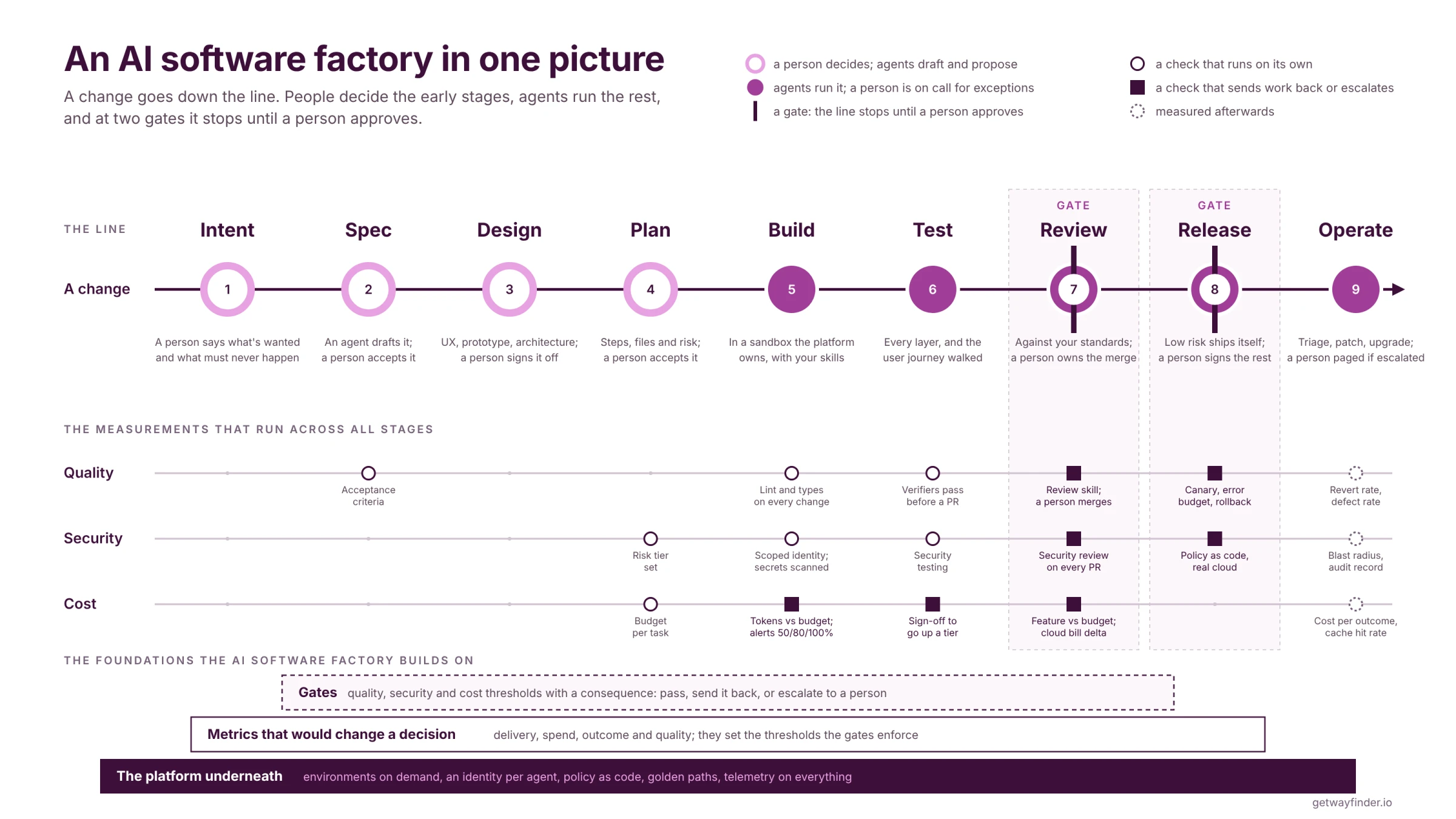
The opening diagram shows nine stages. A gate is a point where work stops until the checks pass or a person approves it.
- Intent: a person explains what they want to achieve. That might be a business idea, a new feature or a problem they need to solve. They describe who it's for, what it needs to do and any constraints.
- Spec: an agent drafts the requirements and how to check they've been met, using what the team already knows about the product. A person shapes and approves them.
- Design: agents draft the user experience, a prototype and the architecture using your design system and brand guidance. A person reviews and approves the design.
- Plan: an agent proposes the steps, the files it will touch and the risks. A person checks the plan before the agent starts building.
- Build: the agent writes the code and infrastructure in an isolated test environment, following your coding standards and running automated checks as it works.
- Test: the agent checks that the work meets the requirements. For a bug, it first writes a test that reproduces the failure. For a feature used through a browser, it tests the user journey there. If it can't verify the result, it reports that gap rather than marking the work complete.
- Review, a gate: agents check for bugs, security issues, your coding standards and whether the work meets the requirements. The team gets the findings and test results, and controls what gets merged.
- Release, a gate: low-risk changes can be released automatically after the checks pass. Anything riskier waits for a named person to approve it.
- Operate: agents investigate alerts, prepare fixes and keep dependencies up to date. The team uses what it learns from incidents to improve the standards and skills.
Quality, security and cost checks run throughout the work, not just at review and release.
Sharing capabilities and skills to scale
If every team builds its own tools and checks, you pay for the same work repeatedly. Teams also end up with different standards, different results and separate versions to maintain. An improvement made by one team may never reach the others.
A skill packages instructions, examples and any supporting tools an agent needs for a particular job. A review skill, for example, can tell it which security and coding rules to check, how to run the checks and what evidence to return to the reviewer.
Sharing that skill means teams can use an approach that has already been tested, then contribute improvements to it. They spend less time working out how to instruct an agent for routine jobs, and reviewers have a more consistent result to assess.
The same applies to capabilities around the agent: creating a test environment, getting access to a tool, running a deployment or recording the cost. Sharing these gives teams a delivery process they can reuse, in the same way software libraries let them reuse code.
Skills need reviewing and testing just like code. Test the agent and skill together on real work where you know what a good result looks like. Does it find the bug? Does the fix work? How much does it cost? Repeat those tests when the model, instructions or tools change.
Uber compared models using real pull requests with known bugs, improving its review agent's accuracy while lowering the cost per review.Uber Engineering, Running a Software Factory Efficiently at Uber Scale, 2026Switching models on the benchmark improved the review agent's F1 while sharply cutting cost per pull request.switching models improved our F1 while dramatically reducing cost/PR Move to whatever is Pareto optimal, and keep moving. The frontier shifts every few weeks.
Uber's review agent, uReview, benchmarked across candidate models
What goes central and what stays with a team
Sharing the process still leaves decisions that belong with each product team. The business problem, the design and what counts as a useful result vary between products, so the team responsible needs to be able to shape how it uses the shared capabilities.
- Central: environments, agent identities and access, shared tools and skills, company security standards, and the workflows that run checks, request approvals and record costs.
- With the project: product requirements, knowledge of the domain, architectural decisions, repository conventions, acceptance tests and skills specific to that team's work.
For example, the company can provide the security review and the workflow for releasing a service. A product team supplies its own acceptance tests and decides which changes need additional approval. The shared process supports the team's work without requiring every product to behave in the same way.
AutoScout24 keeps skills for company-wide problems in a shared collection, with team-specific skills in separate collections. Teams can use both.AutoScout24 Engineering, Designing a coding agent skills marketplace, 2026The shared marketplace is for plugins that encode organisation-wide standards; plugins tied to a single project or a team's conventions do not belong there and go in a team marketplace.encode org-wide standards ... a single project, or team-specific conventions ... do not belong ... Autonomy for updates, governance for additions.
AutoScout24 engineering, 7 May 2026
The context graph the agents need to perform optimally
A context graph records the things an agent needs to know about your software and organisation, and how they relate. A service has an owner, is built from a repository, runs in particular environments and depends on other services.
Without those connections, the agent has to piece the answer together from separate systems. It might find a service in a dashboard, search for its repository, read a runbook to identify the owner, then search deployment records to find where it runs. That takes time and tokens, and leaves more room for mistakes. The graph helps it retrieve the relevant information without loading everything into its context window, the amount of information the model can work with at once.
Take an alert from a checkout service. The graph could link the alert to the service, its repository, owning team, recent deployment, cloud account and test environment. The agent can then find the right code and somewhere to test a fix, with enough information to involve the right people.
An engineering context lake could bring together service records, code references, runbooks, tickets and deployment history. The graph describes the relationships between those records. Collecting the information and keeping those connections current are both important; a link to the wrong owner or an old environment can still lead the agent astray.
In a separate dataset lookup, Uber's agent found the right table in 38 seconds with its context graph. Without it, the same model took 20 minutes and 9 seconds and wrongly concluded the data couldn't be queried.Uber Engineering, Running a Software Factory Efficiently, 2026In one dataset lookup, the agent found the right table in 38 seconds with the context graph. Without it, the same model took 20 minutes 9 seconds and wrongly concluded that the data could not be queried.The grounded agent queried historical usage, identified the specific table used by over 50 analysts, and delivered the answer in 38 seconds.
Uber engineering, August 2026; one dataset lookup on the same model with and without its context graph (Figure 10), not an incident investigation That's one experiment, rather than a speed improvement to assume for every task.
A central LLM proxy
A model gateway, or large language model (LLM) proxy, sits between agents and the models they use. It can control access, record usage and link costs to a team and task. Tool access needs the same controls, even if it uses a separate gateway.
The gateway gives you the model usage behind the cost calculation, but you also need to link its records to the task and the result. That lets you follow a costly run back to the work it was doing and see whether it completed successfully.
How do people work with it?
An AI software factory changes what people spend their time on. The team still needs to decide what to build, assess the result and take responsibility for what reaches users.
Who does what
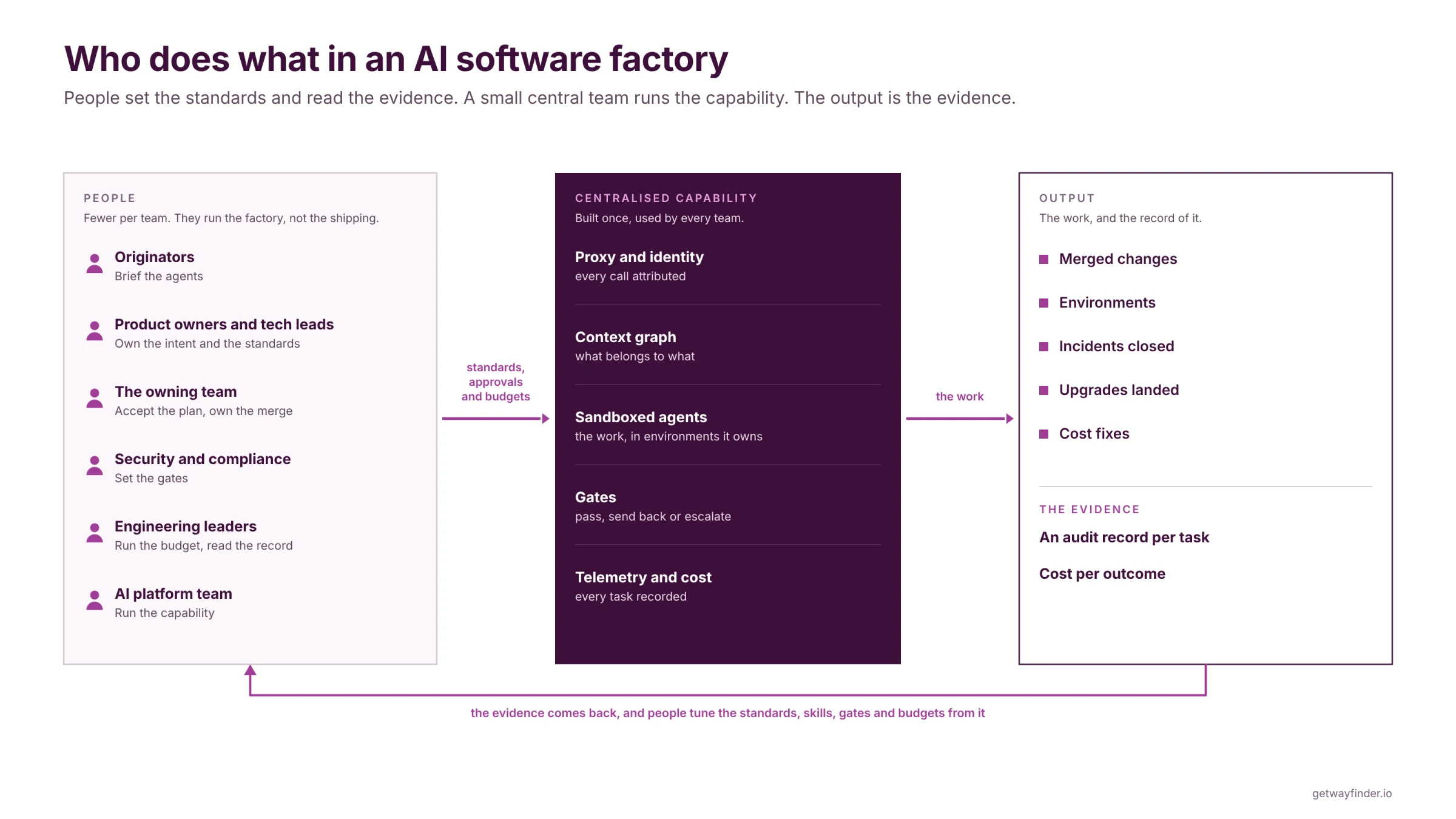
The person proposing the work explains the problem and what a useful result would look like. Product owners and technical leads help turn that into requirements, make design decisions and agree the risks.
The team that owns the service reviews the work and remains responsible for running it. Security and compliance teams define the checks that apply. The platform team provides the environments, access and shared tools the agents need.
Engineering leaders need to know whether this is improving delivery: are teams solving more useful problems, are the results reliable, and what does the work cost?
Users control what gets merged and released
People decide the rules for merging and releasing work, including where automation is allowed. A documentation update may pass through automatically after its checks; a change to payments may need a named reviewer.
The agent should make review easier by showing what it did and how it checked the result. That might include screenshots, a preview environment for acceptance testing and tests against the requirements. Where load matters, include performance results: did it meet the launch target, and what happened when several people updated the same thing at once?
The reviewer can then focus on whether the work solves the problem and whether the remaining risks are acceptable. They shouldn't have to repeat every test just to establish what the agent actually checked.
Stripe's agents produce pull requests that people review before merging.Stripe, Minions: Stripe's one-shot, end-to-end coding agents, part 2, 2026Over 1,300 pull requests merged each week at Stripe are written entirely by agents and reviewed by people.Over 1,300 Stripe pull requests (up from 1,000 as of Part 1) merged each week
Stripe engineering, self-reported, February 2026 That is one example of how a team can apply its approval policy.
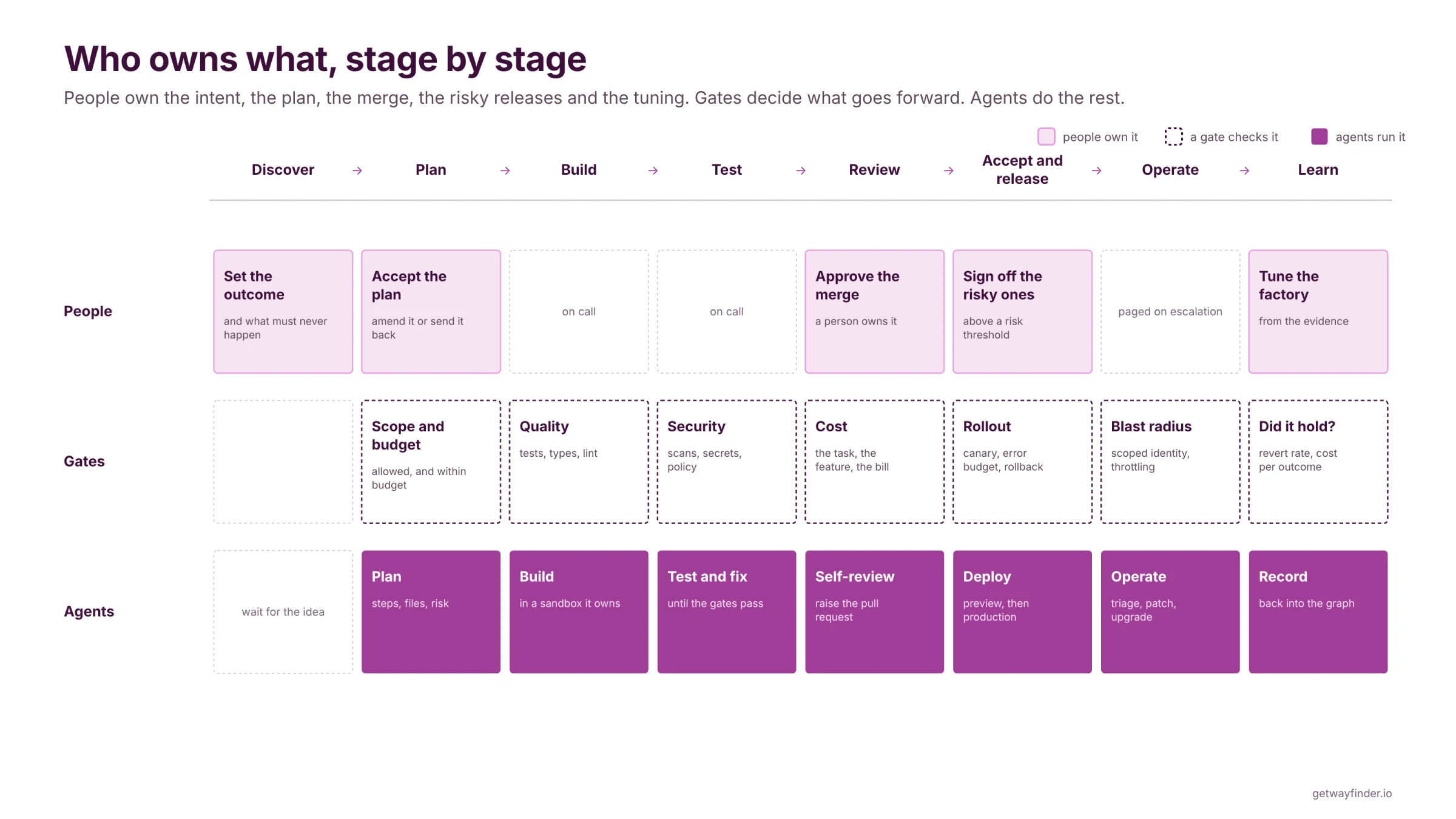
Trust grows one task type at a time
Start with work you can describe and check clearly. A dependency upgrade with good test coverage is easier to assess than a redesign of a payment system.
Once the agent and skill have passed their tests, watch what happens when they handle new work. Does it meet the requirements? Does it stop when it can't verify something? Does a person have to correct the same mistakes repeatedly?
As the results become reliable enough for that task, you can reduce the amount of supervision it needs. Successful runs build evidence; they don't establish that future work is risk-free.
Any percentages in the opening diagram are my view of how work might be divided in a mature factory today. The right balance for your team depends on the task and the evidence you have.
Where the experience lives now
When you introduce a different way to work and start handing the work to agents, you're outsourcing it. Whether outsourcing works comes down to how mature you are at managing and controlling what you've handed over.
Today, a lot of experience lives in people. You rely on the senior engineer who knows why a service works the way it does, or who to ask before changing it.
For an agent to use that knowledge, some of it has to be written down: the decisions, the standards, the instructions and where to find the right information. People still need to maintain that knowledge and judge when it no longer applies.
More product teams from the same people
Gartner predicts that 60% of organisations will adopt smaller software engineering teams by 2029, up from 15% in 2026.Gartner, 60% of Organizations Will Adopt Smaller Software Engineering Teams by 2029, 2026Gartner predicts that 60% of organisations will adopt smaller software engineering teams at scale by 2029, up from 15% in 2026.By 2029, 60% of organizations will adopt smaller software engineering teams at scale, up from 15% in 2026
Gartner press release, 7 July 2026, Aliyah Camacho
I'd argue the bigger effect is opportunity. If the large teams you have today can scale down, you can create more product teams from the same people. That puts the pressure where it should be: on finding more products to build, new markets and new revenue streams.
What needs to be in place to adopt one?
Maturity comes first
We've been here before. Every big shift in how we build software builds on the one before it, and it needs mature foundations to stand on or the building doesn't stay up.
The knowledge in your skills is only useful if the agent can act on it. An agent still needs a way to create an environment, run tests, get permission to use a tool and deploy safely. If people have to raise tickets and wait for someone else to do those things, the agent will face the same delays.
Stripe built its development environments for people long before adding coding agents. It found that the same isolation, predictable setup and ability to run work in parallel made those environments useful for agents too.Stripe, Minions: Stripe's one-shot, end-to-end coding agents, part 2, 2026Stripe built its devboxes for human engineers long before coding agents existed, and found that what is good for humans is good for agents.We built out devboxes for the needs of human engineers, long before LLM coding agents existed. ... What's good for humans is good for agents.
Stripe engineering, February 2026
Platform foundations and ways of working
The foundations I'd expect to see are:
- Environments on demand: an agent can get an isolated environment, run the software and test its work without waiting for a person to set it up.
- Clear identity and permissions: you can tell which agent did what, and it can only access the systems and data its task requires. Google SRE describes separate agent identities and increasing production access gradually.Google SRE, AI in SRE: How Google is Engineering the Future of Reliable Operations, 2026Agents must have unique identities separate from human principals, are not granted full production access from day one, and have their autonomy level managed in real time against error budget status and active incidents.
Agent principals must have unique, machine-distinguishable identities separate from human principals ... AI agents are not granted full production access from day one. ... Crucially, Actus manages the caller's autonomy level in real-time.
Google SRE practices and processes, 2026 - Automated policy checks: security and infrastructure rules are checked as part of the work, before a change can reach production.
- Shared templates and standard approaches: teams and agents can start from an agreed setup for building, testing and deploying software.
- Records you can use: logs and traces show what was requested, what the agent did, what checks ran, what it cost and how it ended.
Stopping points for quality, security and cost
Those foundations also need to enforce the stopping points you agreed. You choose where work must pause and how much the agent can do between those stops.
A quality gate might require tests against the agreed requirements. A security gate might require checks for exposed secrets, vulnerable dependencies and unsafe infrastructure settings. The agent needs the results so it can attempt a fix, and the system needs to enforce the stop if the checks still fail.
Set a limit on repeated attempts too. Stripe gives its agents at most two continuous integration (CI) runs, then returns the branch to a person.Stripe, Minions: Stripe's one-shot, end-to-end coding agents, part 2, 2026After the second push and CI run, Stripe sends the agent's branch back to its human operator.After the second push and CI run, we send the branch back to its human operator for manual scrutiny.
Stripe engineering, February 2026 That avoids an agent repeatedly spending time and money on a problem it isn't resolving.
For cost, distinguish an alert from an enforced limit. Uber uses spend alerts at 50%, 80% and 100%, with manager approval for a higher spending tier.Uber Engineering, Running a Software Factory Efficiently at Uber Scale, 2026Uber alerts at 50, 80 and 100% of expected spend and needs manager sign-off for a higher tier.Manager sign-off for tier upgrades with quick propagation.
Uber's spend controls for interactive and managed agents A hard budget needs a mechanism that stops further work when the limit is reached.
Where does someone begin?
Start with the bug backlog
Where is the value easiest to prove first? Start with the bug backlog. A discrete defect with logs and a reproduction is the clearest brief an agent can get, and the backlog going down is a number the team feels.
Choose a defect the team understands, write down how to reproduce it and agree what evidence would show it's fixed. Keep a person responsible for reviewing the result. That gives you a specific task to improve, rather than trying to automate the whole organisation at once.
Comparing an agent's unit cost with a team doing the same work by hand isn't like-for-like: it works different hours and gets through different volumes. Look at the completed fixes, the review effort, the total cost and whether the problems stay fixed.
Ten practical steps
- Start to measure. Put the proxy in place and record which team and task each request belongs to, which model it used and what it cost. Link those records to the rest of the agent's work so you can follow a task from start to finish.
- Get the telemetry and instrumentation right. These are the logs and measurements that let you see what happened. Whether it's a person, an agent or another part of the system, they should show what it was trying to do, what the ask was, where it came from and what it was using.
- Have a context graph. Make it easy for agents to find what they need without spending a lot of tokens. Without somewhere to look things up, agents can end up loading large amounts of documentation into the model. Too much irrelevant information can make the work slower and more expensive.
- Run evals on your agents so you can track their performance. These are repeatable tests against examples where you know what a good result looks like. Use the measurements from the first two steps to see whether changes to the skills, tools or instructions improve the result.
- Have a central place for agents, skills and MCP servers, so they're shared across teams easily, there's no duplication of effort and the investment in improving them is shared. MCP, the Model Context Protocol, is a way for agents to connect to tools and information. If every team produces its own, at different levels of quality and without traceability, you get different outcomes and different standards across the organisation.
- Make sure your foundations are something you can build on. If you rely heavily on tickets and people rather than automation, agents and skills won't bring value easily. They're not a magic bullet; things need to be in place for autonomy to exist. If people have no autonomy, agents won't either.
- Establish the guardrails and gates. Take identity, permissions, data access, tool access and audit seriously. Locking agents down properly, with traceability of what each one did, helps you diagnose an issue when it happens and improves your security posture. Don't give an agent access to anything until you're confident the controls match what you're asking it to do.
- Assume people are pen-testing you, even if you aren't. Make that one of the key gates. It's easy for bad code to slip in when there's so much of it, and without security and pressure testing you don't want someone outside finding the serious bugs before you do.
- Decide what you want to track, and report against it. This isn't about story points any more; it's the speed of releases and the cost of a feature. Bad code still has impact, though, so bugs, resilience, scalability and mean time to recovery stay in scope. Are security issues being dealt with at a higher rate, and is each fix validated? What's the average time from a security issue being found to the fix reaching production?
- Educate, and share the knowledge. Keep everyone on the journey with you. Have your core innovators and the curious crew lead the way, sharing what you're doing, how and why. People stay motivated to upskill when the stories are real and around them.
Where Wayfinder fits
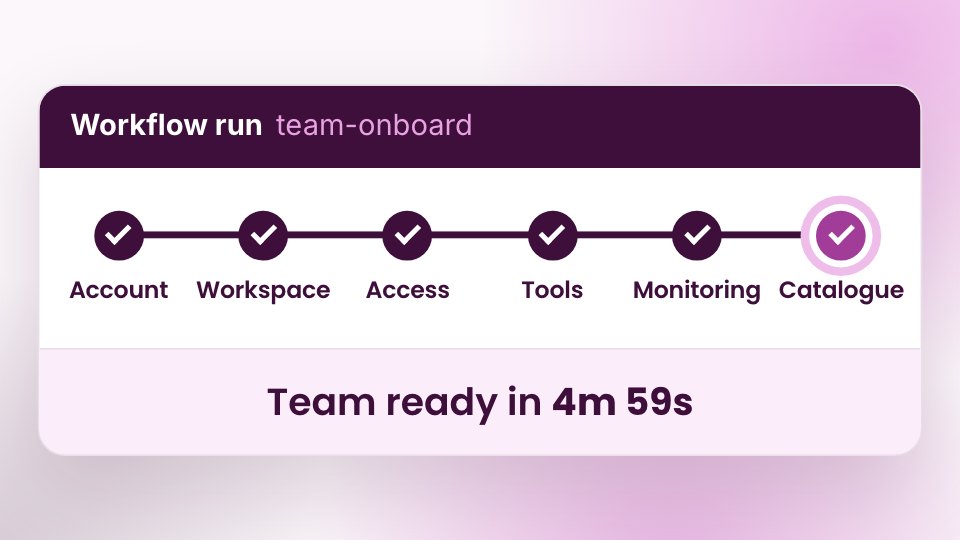
Wayfinder gives you the platform for an AI software factory out of the box: the environments, identity, policies and workflows agents need to work in your cloud accounts. Each agent gets its own identity and environment, changes are checked against your policies, and approvals sit in your workflows wherever you want a person involved.
Read how agents get their identity, how workflows wait for approval and how security and governance work. Then try it now, or speak to us for a demo.