Watch a team get onboarded.
Wayfinder is an internal developer platform that turns onboarding into one workflow. This is the flow in the product. A request arrives, a workflow runs and the new team gets an AWS account and a workspace with its environments. Then the team deploys its first application.
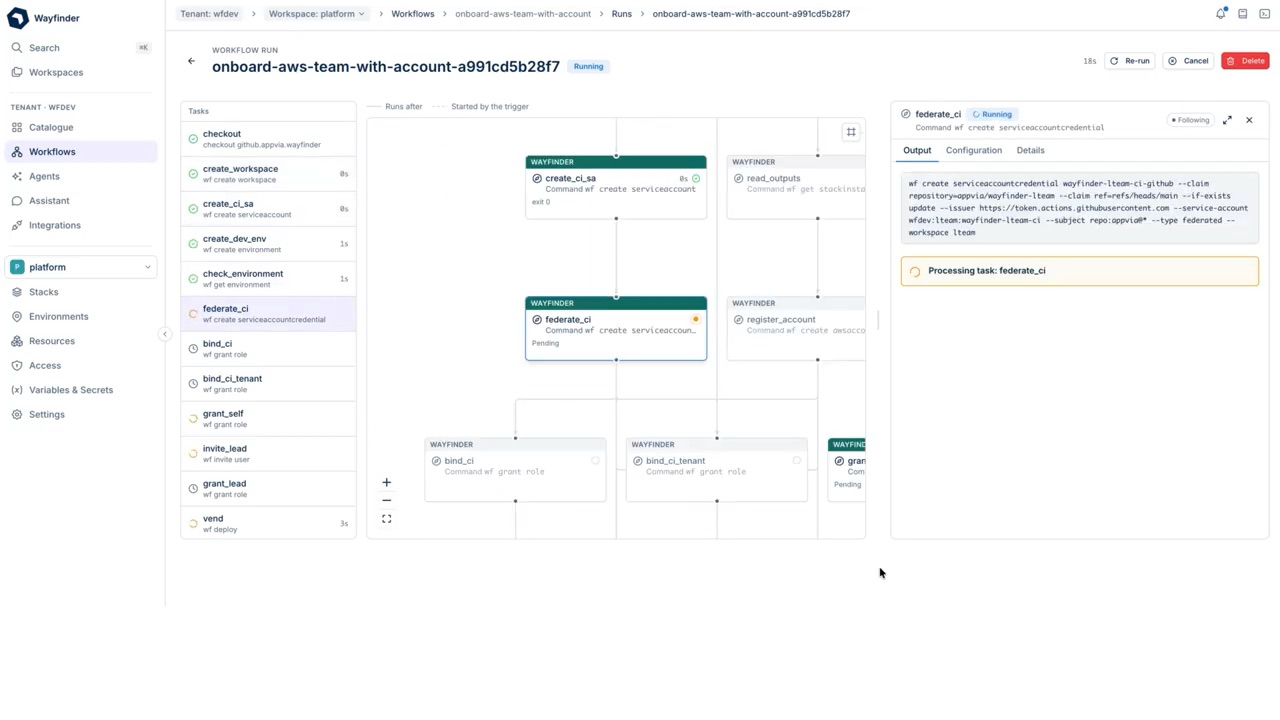
Video coming soon
What you will see in the video
- Setting up your integrations in your tenant.
- Using Wayfinder to onboard a team with workflows.
- Creating an application.
- Deploying an application.
- Today
- 1 day or more78% of engineering teams wait this long for help from the platform team.Port, State of Internal Developer Portals, 2025
78% of engineering teams wait a day or more for SRE/DevOps assistance; Only 22% report getting issues resolved within one day; 16% experience maximum wait times of a week or more
Engineering teams surveyed by Port; sample size not published on the page - With Wayfinder
Wayfinder timings are from our reference deployment and demo flows, not from customer studies.
- 5 minOne workflow run creates the cloud account, access, tools and dashboards for a team.
Timed on our reference deployment.
What onboarding a team involves
When a new team starts, someone has to create their cloud account, set up their workspace and environments, give the team lead the access they need without handing over more than they should and connect the tools the team works in. None of it is hard on its own. It just takes time and it usually waits in the queue of whoever on the platform team is free that week, so a team that is ready to build ends up waiting.
Think of a new starter arriving on their first morning. They are keen and ready to work, but the laptop has not been ordered, nobody has set up their login and nobody is sure who signs off their access. That is what a new engineering team feels like when it waits on the platform team.
By the time a team is properly set up there are five things in place: a cloud account, a workspace with environments, access for the right people, their tools connected and monitoring so they can see what they have built. Most organisations do this by hand from a runbook and each step waits on a different person or a different ticket. That is a big part of why 78% of engineering teams wait a day or more for help from the platform team.Port, State of Internal Developer Portals, 202578% of engineering teams wait a day or more for SRE/DevOps assistance; Only 22% report getting issues resolved within one day; 16% experience maximum wait times of a week or more
Engineering teams surveyed by Port; sample size not published on the page
Why it takes so long by hand
The steps themselves are simple but the waiting is not, because the account request sits in one queue, the access request sits in another and the monitoring set-up sits in a third.
Nobody sees the whole sequence, so nobody can tell you afterwards exactly what was done and in what order. If an auditor asked who has access to what and since when, how long would it take you to find out?
It is a bit like building a house where the electrician, the plumber and the plasterer each take their own bookings and nobody holds the plan. Every one of them does a good job but the house still takes months.
What one workflow does
Triggered by the platform team for a new team called payments. Every task runs as a service account called team-onboard, so the run can never do more than it was given.
- Account
- Access
- Tools
- Observability
- Ready
Triggered by platform-eng for team payments. Every task runs as sa:team-onboard.
- Vend the AWS accountA new account in the right organisational unit with guardrails applied.1m 12s
- Create the workspace and environmentsDev, staging and prod with networking and DNS attached.2m 04s
- Scope the team accessThe team comes from your identity provider and gets roles per environment. No standing admin.18s
- Connect the team’s toolsA GitHub team, an Artifactory repo, a Jira project and a Slack channel.41s
- Stand up monitoringA Datadog dashboard and monitors from the platform template.33s
- Publish the catalogueThe plans this team may self-serve, pinned to versions.11s
Team ready in 4m 59s. Six tasks, one record, repeatable for the next team.
Sample run on our reference deployment. The environments, components and seats you can use depend on your plan.
What the team finds on day one
When the run finishes the team opens Wayfinder and finds everything waiting. The cloud account sits in the right organisational unit with guardrails already applied. The workspace has its environments, with networking and DNS attached. The team signs in through your identity provider with roles for each environment and no standing admin access. Their GitHub team, repository, Jira project and Slack channel are connected and a monitoring dashboard is ready. The catalogue shows only the plans the team may use, pinned to versions, so the first deployment starts from building blocks you have already approved.
Nothing is deployed yet so the workspace starts empty, which is exactly what you want, because the team’s first job is to create an application and not to wait for somebody to set up the place to put it.
How a workflow turns it into self-service team onboarding
A workflow is a trigger, a graph of tasks and a record. The trigger is whatever starts the work, such as a webhook, a resource event, a schedule or a person. The tasks are the steps and they can call a web API, run an agent, wait for an approval, raise a pull request or check a condition, with the output of one task feeding the next. From the command line it is one command: wf invoke team-onboard.
For onboarding, the trigger is a request from a form, a wiki page or a service desk tool and the six tasks above do the rest.
Start it from anywhere
A workflow does not mind how it starts. It can also run on a schedule or by hand from the command line. In the video a webhook receives the request and starts the run, so nobody on the platform team has to be there for it to begin.
Before
- Runbooks that people follow by hand
- Glue scripts on a server someone owns
- Automations nobody can trace after the fact
- Approvals by chat message
- The same fix repeated across teams
With Wayfinder
- Triggers on webhooks, resource events, schedules or by hand
- Tasks as configuration, with no controller to write
- Every run kept: what fired it and what each task returned
- Approval gates anywhere in the graph
- Published workflows every team installs
Why it is safe to automate
The obvious worry with anything this fast is control and it is a fair one. The workflow runs as its own service account rather than as a person and Wayfinder checks permissions when the workflow is defined, so it can never be given more than the person who wrote it has. Where you want a human in the loop you can put an approval gate anywhere in the graph and the run waits until the named people say yes.
Every action is logged and every run can be replayed, so when somebody asks who has access to what you can open the record and show them. It is the difference between telling an auditor you think it is fine and handing them the evidence.
This gives a new team least-privilege access and the workflow itself runs with least privilege too.
What you get for the next team
Run the same workflow again with a different team name and the set-up is identical every time, with the record to prove it. The workflow is versioned, so when the platform team improves a step, such as a tighter access role or a better monitoring template, the next team onboarded gets the improvement. Every run is kept, so you can open any past onboarding, read what each task returned and replay it.
The speed gets the attention but the consistency matters more. A team that used to wait a day or more is ready to build in minutes and team one and team twenty are set up the same way because a versioned workflow does the work and not somebody working from memory. Because any connected tool can be a task, the workflow also grows with the way you work, so if you add a security scan or a cost tag the next team gets it automatically.
Who it is for
Platform teams
Stop running onboarding as a ticket queue. Define it once and run it for every team.
Security teams
Each task acts as a named service account. Access is scoped per environment with no standing admin. Every run is attributable and replayable.
Engineering leaders
A new team starts in minutes with the same set-up as every team before it.
Questions
How do you automate AWS account setup for a new team?
Run a workflow with a task that vends the account. In the example above that task takes 1m 12s and applies guardrails in the right organisational unit. The tasks after it create the workspace, scope access and connect tools, so the account arrives ready to use.
What is platform engineering team onboarding?
It is everything a new team needs before it can ship: cloud account, environments, access, tools and monitoring. Platform teams usually own it. Wayfinder turns it into one workflow that any approved person can run.
How long should onboarding a team take?
One run takes 4m 59s on our reference deployment. 78% of engineering teams wait a day or more when it is done by hand.
Do we need to write code to build a workflow?
There is no controller to write. Tasks are configuration and a workflow names the trigger and the tasks.
Can a person approve a step before it runs?
Yes. Approval gates can sit anywhere in the graph. The run waits until the named people approve and the approval is recorded.
Does it work with the tools we already use?
The example connects GitHub, Artifactory, Jira, Slack and Datadog. Anything with a webhook, an API or an MCP server can be added.
Can we try it before we talk to anyone?
Yes. The live demo has sample data and needs no sign-in. The free plan runs in your own cloud account.
How do regulated firms give developers self-service cloud access without breaking compliance?
They give each team access through a controlled, recorded process instead of a ticket queue. In Wayfinder the onboarding workflow runs as its own service account, scopes the new team’s roles per environment with no standing admin access and can hold for an approval before any step. Every run is kept and can be replayed, so an audit becomes a query. Wayfinder runs in your own cloud account and Appvia is ISO 27001 certified.
Can developers self-serve from our existing Terraform modules?
Yes. Any Terraform or OpenTofu module becomes a cloud resource plan. The onboarding workflow publishes the plans a team may use, pinned to versions, so the team’s first deployment starts from modules your platform team already maintains.